
Shepherd Studio
A próxima geração de IDE para engenharia Dart & Flutter: com IA contextual local, topologia SDD nativa e suporte a monorepos de alta escala.
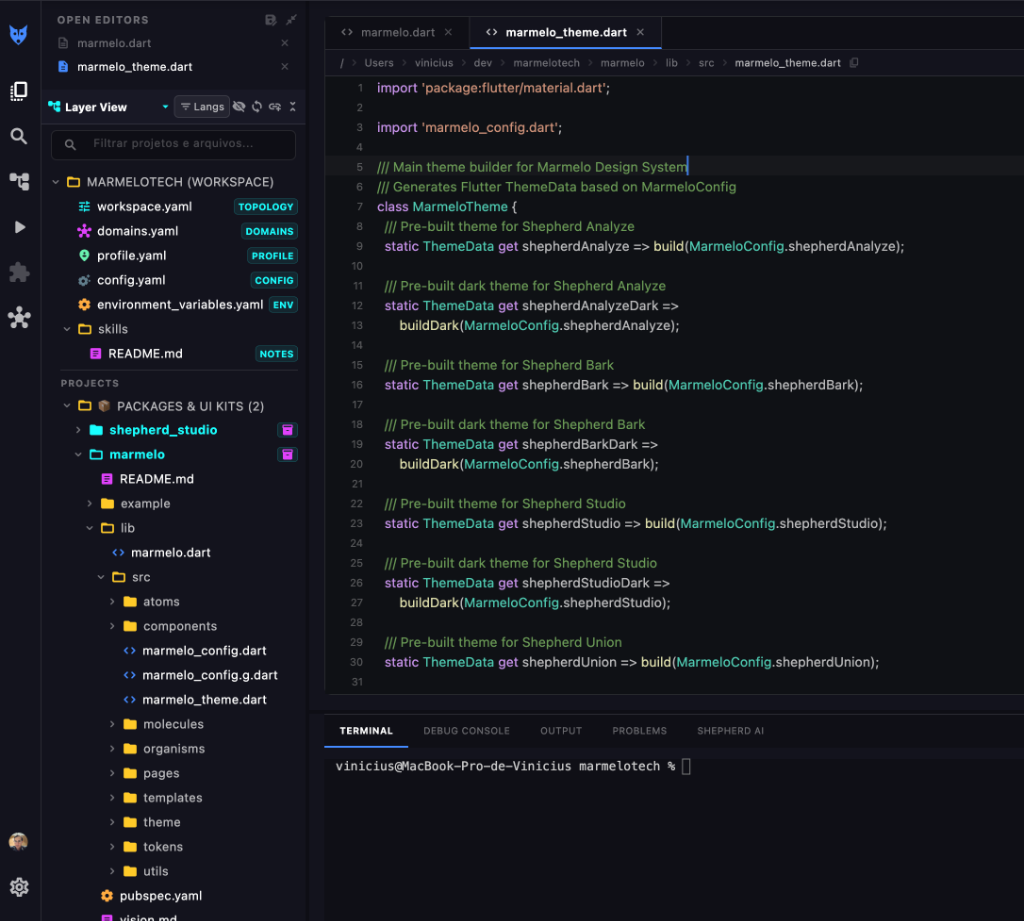
Experiência Visual da IDE
Conheça cada painel e módulo projetado para acelerar o desenvolvimento corporativo de times de engenharia.
Editor Inteligente & Gestão de Monorepos
Visualização em árvore orientada a camadas (Layer View) com suporte a múltiplos projetos, pacotes, átomos, moléculas e organismos do seu Design System.
- ✓ Monorepo Topology: Leitura em tempo real de
workspace.yaml,domains.yamleprofile.yaml. - ✓ Terminal Integrado: Execute comandos zsh, builds e testes sem sair da IDE.
- ✓ Sintaxe Flutter Viva: Edição limpa e responsiva de temas e componentes do ecossistema.
Shepherd AI: Copilot com Modelos Locais
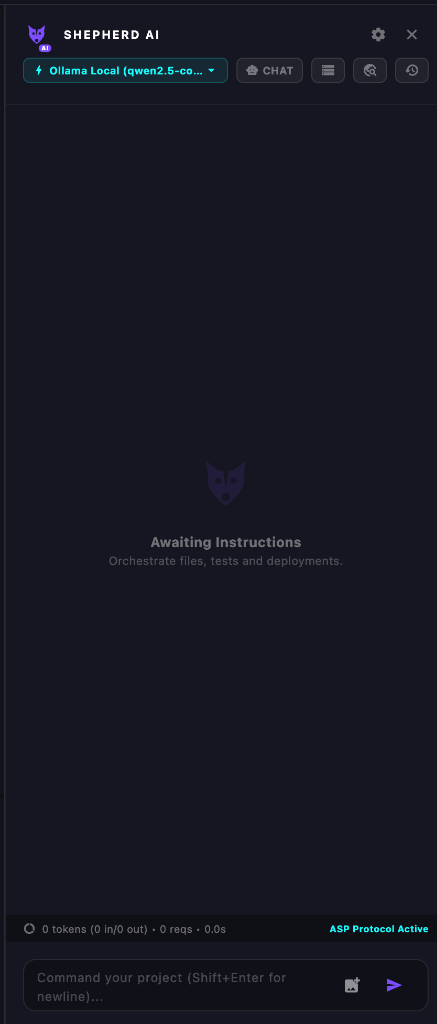
Integração nativa com Ollama local (como qwen2.5-coder) e modelos em nuvem via protocolo ASP (Agentic Shepherd Protocol). Orquestre refatorações, gere testes e automatize deploys com 100% de privacidade de código.
- ✓ Zero Vazamento de Código: Roda modelos de IA inteiramente na sua máquina via Ollama Local.
- ✓ Conexão MCP (Model Context Protocol): Conecte qualquer servidor MCP externo para permitir que a IA acesse ferramentas, schemas de banco de dados, repositórios e serviços em tempo de execução.
- ✓ ASP Protocol Active: Comunicação contínua entre agentes de desenvolvimento e seu projeto.
- ✓ Orquestração Completa: Comande arquivos, gere fluxos de teste no Modo QA e valide regras SDD por chat.
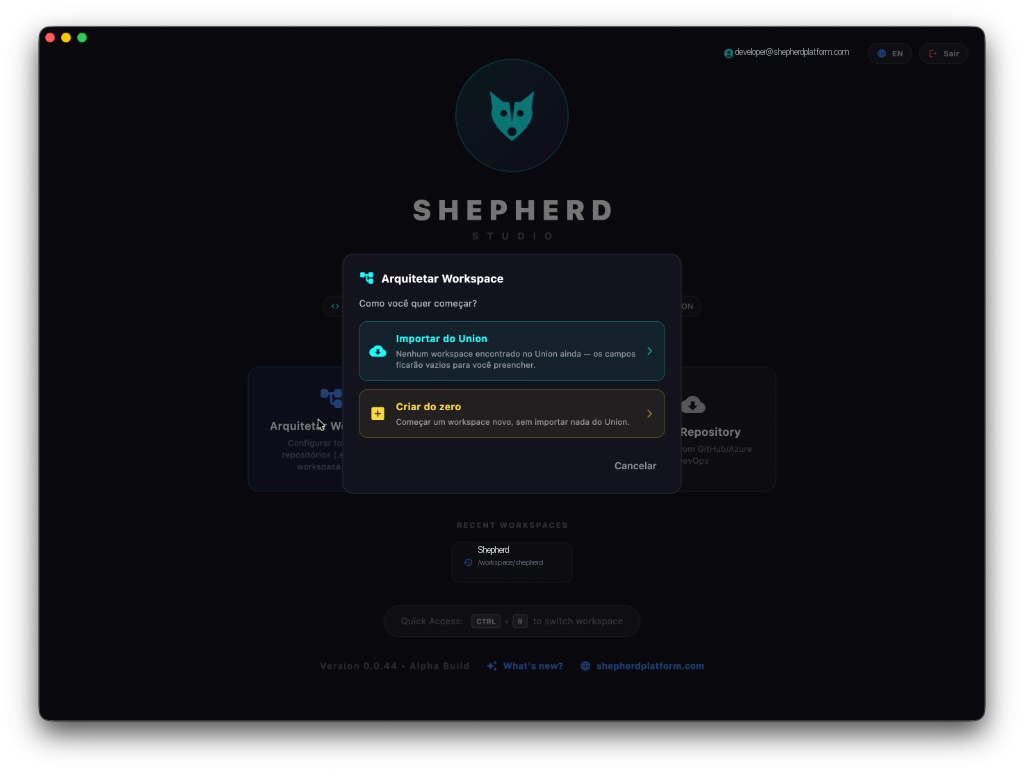
Integração Shepherd Union & Arquitetar Workspaces
Inicie projetos em segundos: importe contratos BFF, esquemas de domínio e topologias diretamente do Shepherd Union para scaffolding automatizado de pacotes Dart e apps Flutter.
- ✓ Importação Shepherd Union: Puxe contratos BFF, domínios e endpoints homologados instantaneamente.
- ✓ Conformidade SDD Contínua: Valide em tempo real se o código Dart adere aos contratos definidos no Union.
- ✓ Scaffolding Padronizado & Recents: Monorepos prontos com Design System Marmelo e atalho
CTRL + R.
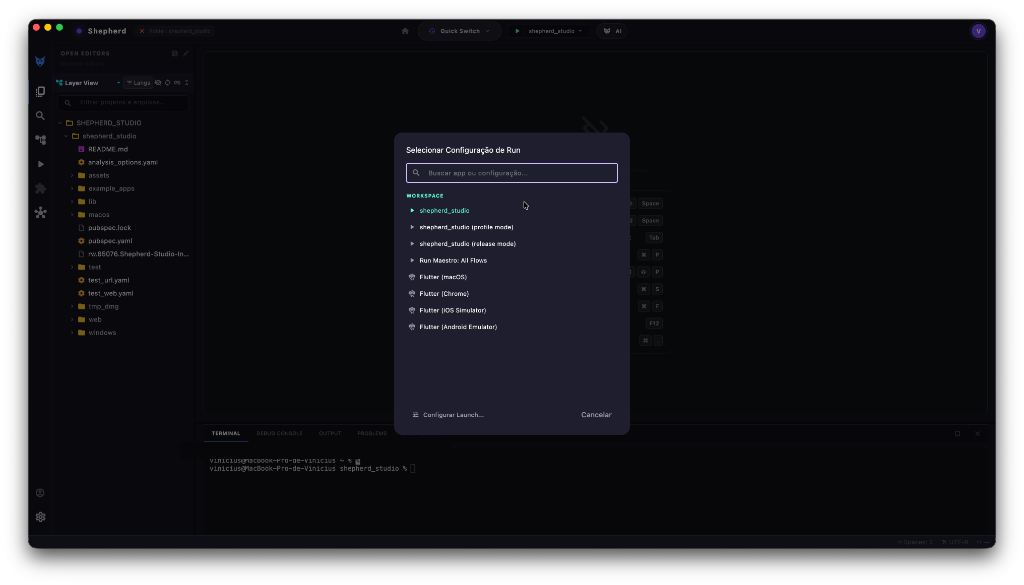
Quick Switch & Paleta Multi-Target
Alterne alvos de compilação num clique: macOS, Chrome Web, simulador iOS, emulador Android ou suítes de teste do Modo QA com shepherd_tag.

- ✓ Hot Reload Instantâneo (⚡): Atualize o estado da sua aplicação em milissegundos.
- ✓ Todos os Dispositivos: Execute em Desktop, Web ou Mobile sem configurações manuais de CLI.
- ✓ Modo QA (shepherd_tag): Execute e inspecione testes visuais ponta a ponta integrados ao pacote shepherd_tag.
IDE com Motor Go & UI Flutter
Arquitetura híbrida de alta performance: motor em Go para análise e automação com interface fluida em Flutter nativo, sem peso do Electron.
Integração Shepherd CLI
Execução de builds, validação de topologias e automação de tarefas de desenvolvimento diretamente dos atalhos e menus da IDE.
Modos Duplos DEV/QA
Alterne entre o Modo DEV para codificação e o Modo QA para inspeção visual de testes, relatórios de cobertura e validação de tela.
Modo QA com Shepherd Tag (pub.dev)
Automação e inspeção de testes visuais executados no Modo QA nativo do Shepherd Studio, orientados pelo pacote Flutter shepherd_tag disponível no pub.dev.
Shepherd Union SDD
Desenvolvimento Orientado por Especificação integrado com o Shepherd Union: contratos BFF vivos, importação de domínios e conformidade estrita de tipos.
Conexão MCP (Model Context Protocol)
Integração nativa com o padrão MCP: plugue ferramentas customizadas, servidores locais ou remotos e permita que o Shepherd AI consulte bancos, leia APIs e execute automações com contexto rico.
Incluído no Ecossistema Shepherd
O Shepherd Studio faz parte do stack profissional da Shepherd Platform.
Pro Workflow Membership
- Todos os Recursos do Studio Full Edition
- Projetos & Monorepos Ilimitados
- Integração Local Shepherd AI & Ollama
- Modo QA com Shepherd Tag (pub.dev)
Pronto para Acelerar seu Workflow?
Passos para Instalação no macOS
- Baixe o arquivo
ShepherdStudio.dmg - Abra o arquivo DMG baixado
- Arraste o Shepherd Studio para a pasta
Applications - Abra pela primeira vez (pode exigir autorização nas Preferências de Segurança do macOS)
🔒 Aviso de Segurança macOS:
O Shepherd Studio está em fase Alpha Build fechada. Durante esta fase de preview, o binário não possui certificado Apple Developer corporativo pago. Isso é 100% seguro: basta usar "Botão direito → Abrir" na primeira execução.